DancePro guide
How to Slow Down and Loop a Dance Video on iPhone
Slow motion helps you see a move; looping gives you enough correct repetitions to learn it. Used together, they turn an iPhone or iPad from a video screen into a focused choreography practice tool.
By Lei Gong · Lazy8 Studio · Published · Updated
Quick Answer
To practice a dance video on iPhone, import a saved video into a player that supports variable speed and A–B looping. Set the beginning just before the musical cue and the end after the movement finishes. Start at a speed where you can complete the pathway cleanly, repeat the section a few times, then increase the tempo in steps until you can perform it at 100 percent without following the screen.
A worked loop: 0:12 to 0:20
Imagine the difficult phrase begins at 0:13 and lands at 0:19. Include a second on each side so you can prepare and finish.
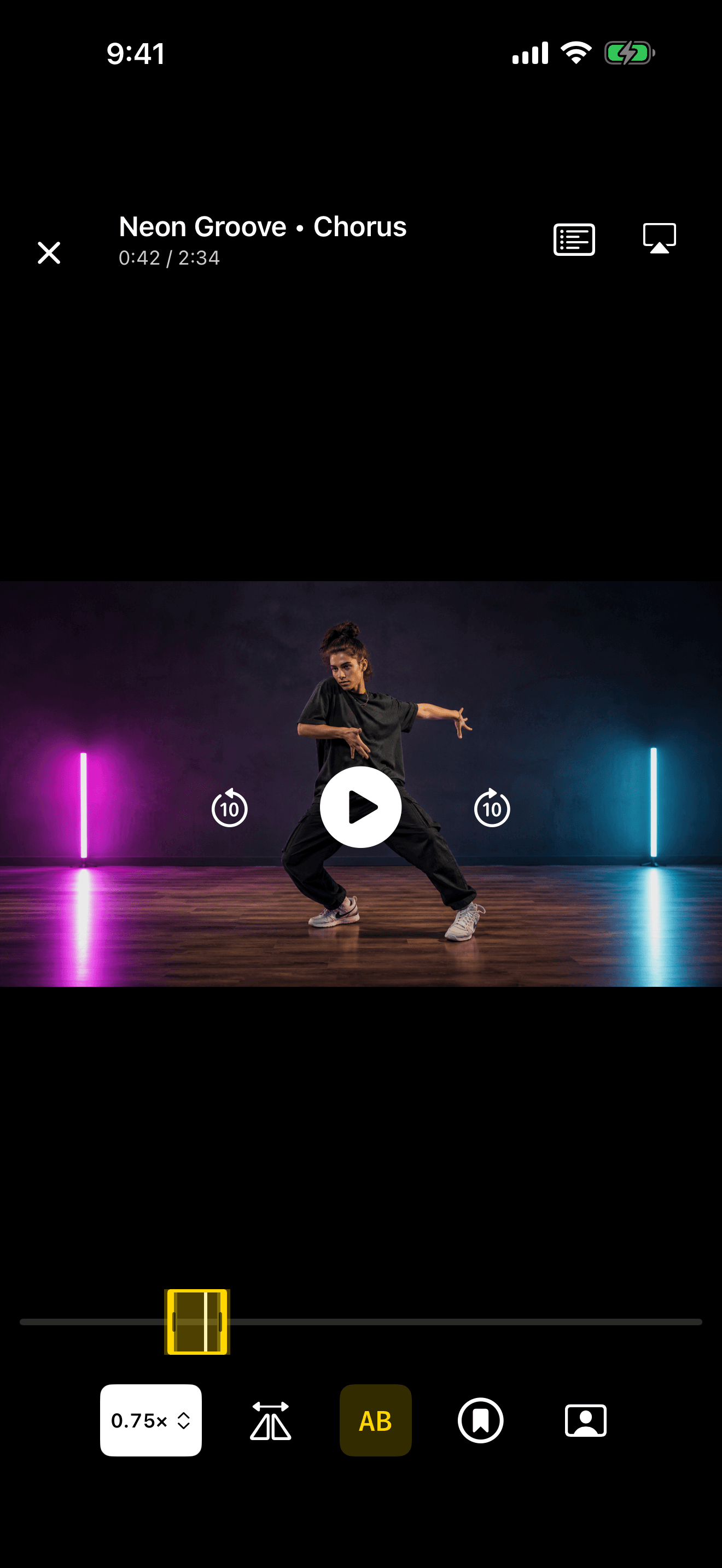
- Import the video from Photos and open it in DancePro.
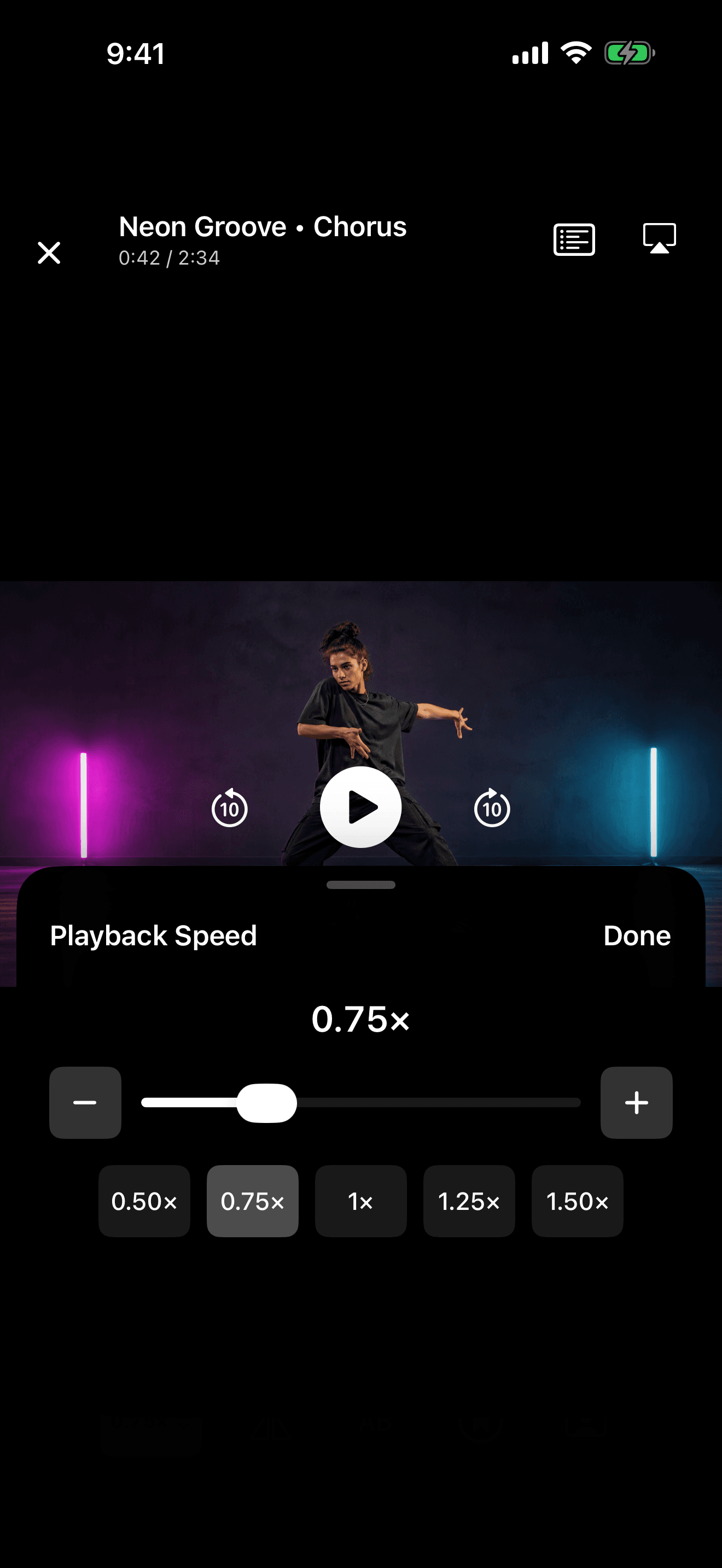
- Open the speed control and select 0.50× or 0.75×.
- Use the A–B control and range handles to select the phrase. Replay once to check both boundaries.
- Repeat a few times, then return to 1× and test the phrase from memory.
Add Beat Sync counts when you want a visual reference for the rhythm.
Ready to check your movement? Follow the recording and review walkthrough for a take beside the reference.
Try this with a video saved in Photos. DancePro combines mirroring, loops, speed controls, and recording on iPhone and iPad.
DownloadSee DancePro features and free practice toolsSlowing Down and Looping Solve Different Problems
Playback speed controls how much information reaches you at once. A loop controls which information repeats. Slowing an entire three-minute routine may make the movement visible, but it still leaves you waiting for the difficult four counts to return. Replaying a short section at full speed may only let you rehearse the same confusion.
Combine the controls deliberately: slow down to understand the movement, then loop a complete phrase to build continuity. As the pathway becomes familiar, raise the speed while keeping the loop boundaries unchanged.
How to Set an A–B Loop for Dance Practice
- 1. Find the problem: Play the phrase once at normal speed and name the exact issue: direction, footwork, timing, arm pathway, or transition.
- 2. Place point A before the cue: Include a count, lyric, or preparation that tells your body the movement is about to begin. A loop that starts on the move can make every repetition feel late.
- 3. Place point B after the landing: Give yourself time to complete the shape and transfer weight. Cutting the ending short teaches you to abandon the movement.
- 4. Test the reset: Make sure the jump from B back to A gives you enough time and space to restart safely. Widen the loop if you are rushing into position.
- 5. Repeat with one focus: Choose one observation per set—feet, arms, timing, or texture—instead of trying to repair everything at once.
Choose the Right Practice Speed
50 percent (0.5×)
Start at DancePro’s slowest playback speed to inspect a rapid change or coordinate overlapping movements. Pause and scrub when you need a closer look.
75 percent (0.75×)
Use this range to coordinate body parts and finish shapes while still feeling the phrase as movement.
Near full speed
Use near-tempo practice to find transitions that fail only when there is less time to prepare.
100 percent
Use full speed to test memory, timing, stamina, and performance quality. It is a test of the work, not the only place the work happens.
Use a Tempo Ladder Instead of Making One Big Jump
A simple ladder using DancePro’s speed presets is 50, 75, and 100 percent. Perform two or three clean repetitions at one speed before moving up. If the same detail collapses twice, step back one level and reduce the task instead of forcing more full-speed attempts.
Clean does not mean perfect. It means you know the direction, complete the movement, land close to the intended count, and can begin again without guessing. Keep the musical accents recognizable at every level.
Do not train only in slow motion
Momentum, balance, and texture change with speed. Slow playback is a microscope; full tempo is the environment where the movement must eventually work.
Common Looping Mistakes
The loop is too short
A single pose may hide how you enter and leave it. Include the preparation and the result.
The loop is too long
If only two counts need work, repeating thirty seconds dilutes attention and adds unnecessary fatigue.
Every repetition is identical
Change the focus: mark the feet, add the arms, perform without looking, then record one complete attempt.
You never connect the section
After isolated practice, widen the loop to include the preceding and following phrases so the fix survives in context.
A Faster Workflow in DancePro
DancePro lets you import a dance video saved on your device, adjust playback speed, and set exact A and B points around the movement you want to repeat. You can mirror the same reference, save important timestamps as named bookmarks, and open the camera when you are ready to compare a take.
The value is not simply that the video plays slowly. It is that the reference stays organized around the practice decisions you have already made, so tomorrow's session can begin at the difficult section instead of searching for it again.
Practice the count, not the rewind button.
Use speed controls and precise A–B loops in DancePro to repeat any section of an imported dance video, then raise the tempo when the movement is ready.
DownloadFrequently Asked Questions
Can I slow down a dance video on iPhone?
Yes. The available controls depend on the video and player. A dedicated dance practice player such as DancePro lets you change the speed of an imported video and combine slow playback with section looping.
What speed should I use to learn choreography?
Use the fastest speed at which you can understand and complete the movement correctly. DancePro supports 0.5× to 1.5× playback; try 0.5× or 0.75× for a difficult phrase. Move toward full tempo as soon as the pathway and timing are stable.
What is an A–B loop?
An A–B loop repeats the video between two chosen timestamps. Point A is the beginning and point B is the end. It is useful for drilling one phrase or transition without repeatedly scrubbing backward.
How many times should I repeat a dance move?
There is no magic number. Use small sets of attentive repetitions, pause to test the move from memory, and change something when errors repeat. Ten distracted attempts are usually less useful than three attempts with a specific focus and review.
Does slow practice make dancing look stiff?
It can if you treat the choreography as disconnected poses or never return to tempo. Preserve direction, rhythm, weight transfer, and intention while moving slowly, then practice at increasing speeds so momentum and texture return.
Keep Learning
Explore DancePro, the dance practice video player for iPhone and iPad.
Sources and Further Reading
These references informed the guide. Dance training is individual; use qualified instruction for technique, injury concerns, and movements that are new or unsafe in your space.